
Account and data
Your data: sync it, export it, delete it.
What's stored where, what AI sees, and how to manage your subscription.
On this page
How it works
Your workouts, food and body measurements sync to your GoodEnough account, so they're backed up and follow you to a new phone. Your profile (age, sex, height and injuries) and your progress photos stay on your phone and in your own iCloud, which we can't read.
Some features use Google's Gemini AI: meal photos and descriptions, body photos, progress photo reviews and the coach. The app asks your permission once for each.
Sign in and sync
You create an account with Apple, Google or email during setup. On a new phone, tap I already have an account on the first screen and your history comes back.
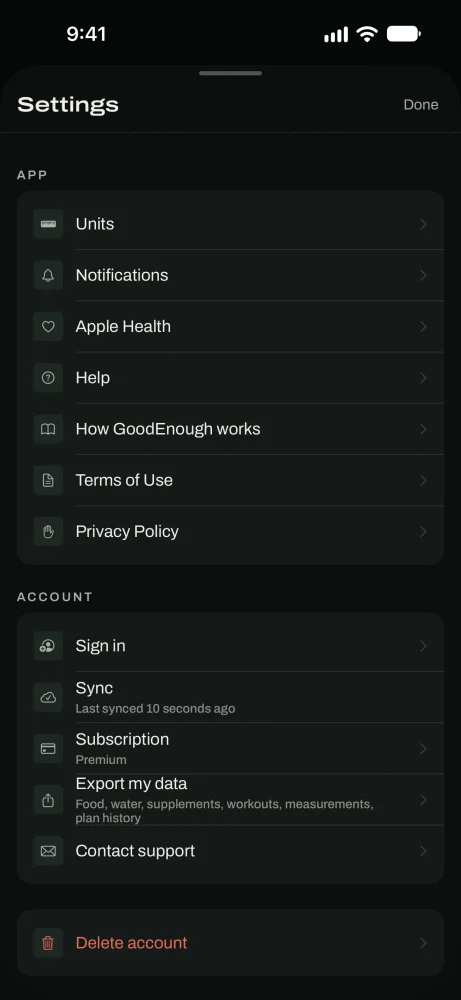
Settings › Sync shows whether everything is saved. If something is stuck, it tells you and lets you copy the details for support.
Subscription
GoodEnough is $9.99 a month with a 7 days free trial, or $59.99 a year with a 30 days free trial. Nothing is charged until the trial ends.
Settings › Subscription shows your status. Tap Manage or cancel subscription to change plans or cancel through Apple. If you cancel, you keep Premium until the end of the period you paid for.
New phone and asked to subscribe again? Tap Restore on that screen.
Export or delete your data
Export your data
Tap Export to save one JSON file with everything you've logged: food, water, supplements, workouts, sets, measurements, check-ins, wellbeing and plan history.
In the appSettings › Export my data
Delete your account
Tap Delete account and confirm. This permanently deletes your account, your synced history and your meal photos from our servers, and clears the app's data on your phone and your profile and progress photos from your iCloud. It can't be undone.
Deleting your account doesn't cancel your subscription. Cancel it in your Apple Account's subscriptions first.
In the appSettings › Delete account
Where your data lives
Your GoodEnough account: workouts, food, body measurements, check-ins, coach conversations, and weights imported from Apple Health.
Our cloud storage: meal and food package photos you use to log food.
Your phone and your iCloud: your profile (age, sex, height, injuries) and progress photos. We can't read them.
Apple Health: read on your phone. Only imported weights are copied to your account.
Not kept by us: body and progress photos sent for AI review are deleted once the result comes back.
Full details are in the privacy policy.
AI permissions
The app asks once for each AI feature: meal estimates, body-fat photos, progress photo reviews and the coach. Choose Not now and that feature stays off. Everything else keeps working. Google doesn't use what we send to train its models.
Get help
Settings › Help explains the basics inside the app. Settings › Contact support sends us a message, or email support@getgoodenough.com.
Good to know
- TipSign in before you switch phones so your history comes with you.
- TipCancel your subscription before deleting your account. Deleting doesn't cancel it.
- TipExport your data any time. It's a plain JSON file you can open anywhere.
- TipGoodEnough is for adults 18 and over.
Questions
Keep reading
Getting started
Answer a few questions, get your targets and your workouts, then log your first meal.
ProgressProgress and Apple Health
Today's targets, your weight trend, your measured daily burn, and Apple Health.
CoachCoach
Ask about your targets, your workouts or a bad week. It answers from your own logs.
Still stuck? Email support@getgoodenough.com.
Coming soon